Archive

Archive for August, 2009

The Corporate Love / Hate with Social Media

August 31st, 2009 Comments off

love hateTwo sides of the same coin. Two different studies show how companies have almost contradictory views when it comes to social media sites.

On the one hand, a study from Marketwatch shows that almost half of all companies surveyed use social networks to screen potential job candidates. On the other hand, a study from ScanSafe shows that over 75% of companies block social media sites from their employees.

If you read the two studies, there are some interesting stats within. For example, the following results in employee screening were most likely to have a candidate rejected from getting the job:

  • Provocative or inappropriate photos (53%)
  • Content about alcohol or drug use (44%)
  • Negative comments about previous employer (35%)
  • Shared confidential info about previous employer (20%)

Most interesting to me was that 16% of respondents rejected a candidate because they used a smiley face or other emoticon. 🙂

Facebook and LinkedIn were the tools of choice for employers, while Twitter was last at 7%.

With the other study, there weren’t too many surprises in companies blocking social networking from the workplace. Unless the company’s business is social media, most companies feel they would have a lot of people soaking up a lot of valuable time at the office being social.
What’s ironic is that most of those companies that would block social networks from their employees either have, or are working towards, having a significant presence on those same social networks. Interesting…
Categories: social-media

Social Networking… who’s your audience?

August 27th, 2009 2 comments

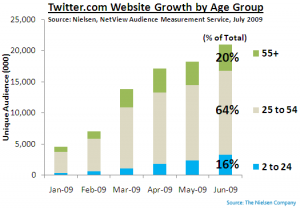
twitter_by_ageContrary to popular belief, if you’re trying to reach a young audience, Twitter may not be your best bet.

(Side note… am I dating myself be defining “young” as under 25?)

A recent study by Neilsen has shown that the vast majority of Twitter users are over 25.  I’m actually supposed to know this stuff, but even I was surprised that 20% of Twitter users are over 55!

The New York Times has an article trying to understand why teens shy away from Twitter. But the same article also makes some interesting points on what Twitter’s main attaction is to the older crowd.

Though Twitter’s founders originally conceived of the site as a way to stay in touch with acquaintances, it turns out that it is better for broadcasting ideas or questions and answers to the outside world or for marketing a product. It is also useful for marketing the person doing the tweeting, a need few teenagers are attuned to.

So again, the same old lessons. First, make sure you know your target audience. Second, make sure they are tuned to the channel you choose to transmit your message. Third (and most important), make sure the message you are transmitting is relevant and engaging to your audience.

Categories: social-media

The essence of Digital Project Management

August 27th, 2009 Comments off

Nobody has ever said it better than the guys at Manager Tools. The art of project management in a digital world boils down to a simple question:

Who’s going to do what by when?

300px-MagrittePipeIt doesn’t get any simpler than this. And this is what project management on a digital project is all about. It’s simply defining the task list of what has to get done in chronological order, getting a name beside each task, and setting a realistic deadline to each item.

Of course, this doesn’t apply to a typical PMO in a large organization. The PMO “process” has many other steps, reports, meetings, documents, etc., that have to be filled out in triplicate to push a project along. But those steps (in my experience) are not there to help a project get completed. They are there to protect management from being called to task for a project that failed. Piles of paper can be pointed to that prove that, even though the project failed, the process succeeded!

If you actually listen to the podcast, they make mention of the picture of a pipe. It’s a metaphor that speaks loudly to the mistake many project managers make. Many PMs point to the BRD, TechSpecs, MSProject Plan, QA Plan, Go / No Go criteria and call it the project. As Mark Horstman so beautifully states, those are *not* the project! Those are representations of the project. The project is what the hands on the keyboards are working on, not the reports.

The picture of the pipe says it all. If you’re not literate in French, the text essentially reads, “This is not a pipe.” Meaning, of course, that it is *not* a pipe, it is a representation of a pipe!

Your project plan is a representation of your project. It is *not* your project. Your plan shows “Who’s going to do what by when.” The Who, What and When are your project.

Categories: Management

Providing the “Table Stakes” for your Corporate Website (Pt. 2)

August 26th, 2009 Comments off

dealer chipsPreviously, I started talking about the basics your corporate site has to have to provide the information your customers will be looking for on your site. The list continues here:

Contact information
This is an easy one, but there are so many corporate websites that overlook it. The basics to provide on this page are:

  1. A real street address for your head office and all regional offices
  2. Real contact email addresses for Sales, Support, Questions, Press, General. By real, I mean an email address that is monitored and responded to by a human being within 48 hours. And that response needs to be human, relevant to the question or comment, with a real person’s name and response address attached to it.
  3. A job board that is current. No old and filled jobs. All current openings posted. An email address to contact for each position (please don’t use one of those generic recruiting services that make the applicant fill out generic questionnaires. Instead, provide an email address to reply.
  4. A phone number for each office and for general inquiries that is staffed by a human.

If someone is going to your Contact Information, they obviously want to contact you. Make it as easy as possible.

Frequently Asked Questions
This could be an offshoot of your Contact Page, but the FAQ needs to be questions that are… er… Frequently Asked. This is not the place to include puffery or sales/marketing speak. Answer the questions here and you’ll save yourself having to respond to dozens or hundreds of the same requests. Give the answers a human voice. Written by a real person. A mild sense of humour here doesn’t hurt if the questions are not serious.

Latest News
If you’re big enough, you’ve been in the news lately. This is the place to link to all the articles in the newspapers and top blogs. If it’s positive, you can thank them. If it’s critical, it’s a great place to respond to it. This is the toughest one, as many companies have a deep-seated fear of drawing attention to criticism, let alone responding to it publicly.

If you want your corporate website to be viewed as anything other than biased marketing fluffery, these are the basic things it needs to include. If you want to take it to the next level and actually interact with your customers, the company needs to take a deep breath, cast aside some basic corporate fears, and dip the corporate toe into this thing called Social Networking.

Categories: Basics

Providing the “Table Stakes” for your Corporate Website (Pt. 1)

August 25th, 2009 3 comments

poker

I posted earlier about what users are (or will be) looking for when they visit your company’s site. First let’s talk about the basics. What do you need to have on your site that just get you in the game (the table stakes, to use poker terminology).

Brand information
Obviously, the brand comes front and centre. The main landing page has to reflect your brand properly. All brand attributes need to be reflected, not only in the look and feel, but also in the experience. That means that, unless you want your brand associated with “wasting my time,” or “making me do unnecessary things,” don’t have a splash page. Your URL leads directly to the message you want to get in front of your audience right away.

(Side Note: It seems that most web developers realize this intuitively. Most splash pages have the “Skip Intro” link, leading me to believe that most developers understand that people don’t want to see it. I’d love to see the stats to see how many people watch the splash intro in its entirety.)

Company information
Who are you? What do you stand for? Who are your leaders? What’s coming up for the company, including any major press releases, trade show presentations and public financial information. This is where people doing research into the company are going to gravitate. It’s a great opportunity to put your best foot forward.

Major product and/or service information
You have products or services you want to promote, right? Keep this section updated, relevant and with all of the information your customers will want to know about the products or services, including specifications, limitations, updates, notices and, if applicable, where and how to purchase them. If you don’t already have eCommerce capabilities, link to the resellers that have your products, preferably directly to the product purchase page. Make this interaction as Low Friction as possible.

Search engine (that works!)
Invest in a search engine for your site that actually works and delivers the results users are expecting. This is not just good user experience, but also a great way for you to get insight into what your customers relate to your brand. Don’t make them hunt. Again, Low Friction interaction on your site.

… Continued

Categories: Basics

Product Strategy

August 25th, 2009 Comments off

strategyMonica Harrington makes a great point about Product Strategy:

Consumers don’t care about strategy. Corporate customers do because if they’re investing big dollars over many years in a product, they want to know that it will continue to evolve in ways that are beneficial to the organization. In the corporate market, selling a vision is huge. By contrast, selling a vision to consumers is pointless. The key question they want answered is, “Does it make my life better today?” (BTW, I suspect Bob 3.0 had potential to be great.)

Monica worked on Microsoft Bob and shares some great lessons about product strategy and product teams.

Categories: Strategy

Making your Corporate Website relevant

August 23rd, 2009 1 comment

The biggest challenge most companies have with their corporate website is making it relevant. The tough questions to ask when your corporate site is being built (or, more likely) redesigned are:

  1. With billions of sites one could type into the address bar, why would they type in the name of my company? What would they be looking for?
  2. Are we going to provide that?

For the first question, if you have a well known brand, you may think you know why the user is coming to your site. They want product sales information. Right?

Maybe not.

Recent studies have shown that for the web savvy users, product decisions are not made at the product’s website. Instead, those decisions are made from review sites, from shopping sites, or more often recently, through social networks. Going to your brand’s site is generally the last step in making a product decision. Looking for a final reason not to part with their hard earned money.

So, what is the user looking for? It can be several things:

  • Locations to purchase
  • Specifications
  • Competitive information (why ours is better then theirs)
  • Support
  • Community

Therefore, question 2 is a difficult question. Are you really willing to provide any or all of the above on your company or brand site?

Over the next several posts, we’ll dive into some of the above reasons to discuss the pros and cons of providing what your users may want.

Categories: Basics

Search Engine Stats (pt. 2)

August 21st, 2009 Comments off

everystockphoto-2073338-lPreviously, I wrote about how checking the “Zero” results in your search engine can provide useful insights into what users were linking your brand to in their minds, and how you can take advantage of that.

The other thing Search Engine Stats can provide you is with a better search experience for your users using the concept of Folksonomies. This is the corollary to Taxonomies. In a taxonomy, someone on the web team (usually an Information Architect, or a User Experience Expert) will try to order your content in a logical, human way.

In a Folksonomy, you let the actual actions of your users dictate which content is most relevant. Digg would be a classic example of Folksonomies in action.

But back to Search Engines. Tuning your Engine to look at search results returned to users and the click through that follows can give great insight into what users are linking certain terms to with your brand, and it will help provide a better search experience.

For example: A user searches for the term “Widget” on your site. On the search results page, they click on item number 7 on the page. OK… the engine needs to log that and remember. The next user that searches for widgets will see that previously clicked result at item number 5 on the search results list. If that user clicks on link 5, the next time a user searches for “Widget”, that same result will be higher and higher until it “automatically” becomes to top search result whenever anyone searches for it.

This not only provides a better experience for the user, but now you, as the brand owner, will know what content on your site is most relevant to the “Widget” audience and can take advantage of that knowledge next time you’re looking to launch a “Widget” campaign.

Categories: Strategy

Brand Interaction

August 20th, 2009 Comments off

This is a tough sell. I occasionally keep my mouth shut when others are talking about “how to get our users interacting with our brand.” But I often lose that battle, throw out the following bit of experience, and watch as all eyes turn to me like I have two heads.

People don’t want to interact with your brand. People want to interact with people behind your brand. That’s the SOCIAL part of social media!

… more to come

UPDATE: I swear I didn’t see it before I posted this, but THIS says it better than I just did.

Categories: Strategy

If you can’t explain it…

August 20th, 2009 Comments off

scratching headChild

One rule I trust is that if you can’t explain your concept, idea, technology to your own mother in a way that she’d understand it, you are either don’t understand it yourself or you’re bluffing (and I don’t mean BLUF‘ing).

I’ve seen this at both end of the spectrums. The “Strategist” talking about trending, friction, positioning, audience interactions, etc. but never getting down to a basic strategy that is simple and graspable. On the other side, the technology guru that talks about CMS, CRM, PHP, SQL, etc., but can never explain whether or how it will work in any human readable form.

Anyone that’s ever worked with me is used to my question of “Explain it to me like I’m a 6-year-old.” It frustrates them because they think I don’t get it. That may be the case, but quite often, I’m questioning whether the person explaining it to me “Gets it.”

Categories: Management

Search Engine Stats (pt. 1)

August 19th, 2009 2 comments

lens_magnifying_glass_266925_lThe search engine on your site can provide some meaningful brand insights, if you look at the stats in the right way.

There are the standard sets of data that web site managers pull off as a matter of course:

  1. How many searches were performed
  2. What % of users use the search engine
  3. The top searched terms
  4. Whether any results were clicked through

But dig a little deeper and some interesting data appears. For example, pull a report on which search terms were entered that returned exactly ZERO results. What does this tell you? It means that someone typed in the URL for your brand. In their mind, your brand = what they were looking for. And your search engine told them to go elsewhere. There is some incredible insight there! What if you looked at all the “Zero” returns and provided a page or a redirect that gave the user what they wanted from your brand?

A real-life example of this is in one of my previous lives at a financial company. When we examined the search engine logs, we found several users had typed in the search term “Wrap Products.” (For those that don’t know the Canadian Mutual Fund industry, a wrap product is a specific type of mutual fund that consists of other mutual funds).

My client didn’t offer Wrap Products, so there were no results. The company essentially said, “We know you came to us wanting a Wrap Product, but go away!”

A slight tweak to our search engine and the addition of a single page, and now the search term “Wrap Product” brought you to a page that explained why we didn’t offer Wrap Products, and pointed you to some of our products that competed with the Wrap market. Now we were saying, “We know you wanted a Wrap Product from our brand, but we have something better for you!”

A 0.1% tweak to our search engine, an 110% improvement in user experience and the user’s perception of our brand.

Categories: Management, Strategy

Because You Can

August 15th, 2009 Comments off

I see it more often than I should. Flash games where they should not exist. A Twitter account from a major company or brand that hasn’t tweet’d for the last six months. A corporate web page that has outdated promos talking about an event that happened months ago.

At the company I work for, there are several examples of frills and functionality added to applications and sites that are added on the principle of BYC… “Because You Can.”

Before any new initiative or update takes place, think about this…

Is what I am going to do going to help my customer / client / user do something that they “want” to do or “need” to do? Does it move my brand forward? Does it add real value? Is my / our effort better spent elsewhere?

Because, just because you “can” add that game, or chart, or step, doesn’t mean you “should”

Categories: Strategy

Thoughts on a PMP

August 14th, 2009 Comments off

In 2003, I studied for, took my exam for, and received my Project Management Professional designation (PMP). Since then, I’ve come across several people with their PMP, some even in Project Management positions!

I’ve been asked several times whether getting a PMP is worth the time, effort, and yes, money. I’m of two minds on this.

PROS:

  1. There is no doubt that having those three letters after my name on my resume have pushed me into the interview pile. Many job postings require a PMP. If I had to guess, the main reason would be to have another point of exclusion amongst the pile of candidates.
  2. Some of the theoretical knowledge gained from studying for the PMP has been useful. I can talk the lingo, understand a project plan (and often, see the faulty assumptions faster), understand the risks and can work with the PMs with the same language.
  3. It’s provides some credibility with Senior Executives when explaining why you can’t have nine women create a baby in a month.

CONS:

  1. Unfortuantely, the PMP is geared towards big IT or Engineering solutions (at least is was in 2003). It doesn’t scale down well. In the world of digital, spending weeks on the Project Charter and more weeks on the Requirements means that someone else is going to eat your lunch.
  2. Much of it is not applicable to the iterative processes like Agile / Scrum, that are more prevalent in digital agencies. A die-hard PMP project manager would have a heart-attack when asked to start building before the second requirement comes in the door.
  3. In my experience hiring and working with Project Managers, the true test of whether someone will cut it as a PM on digital projects is “Notches on the Belt.” How many projects has the PM actually taken from a gleam in the eye to live? That is the true test for any PM in an interview. I’d rather hire a PM that’s launched sites, but does not have a PMP, than any professional Project Manager with a PMP that has taken very few projects to the end (no matter how big).

So… bottom line at the bottom (ignoring my earlier advice). Is a PMP useful? It can be in certain scenarios. If you are looking for a new job, and you can get the cost of a PMP covered, and you have already taken projects end-to-end to back your PMP, I think it’s worth it.

Otherwise, the theoretical knowledge received from the PMP will come back to bite you when the reality of a digital project gets in the way of your beautiful WBS.

Categories: Management

BLUF (Bottom Line Up Front)

August 14th, 2009 Comments off

Being a people manager, I receive many emails from my team and from others regarding an issue or a situation with which they require my assistance. Quite often, I have to read an entire story before I get to the question or issue at hand.

I’m a big fan of Mark Horstman and Michael Auzenne from Manager Tools. Although the concept of BLUF (Bottom Line Up Front) is not theirs, they discuss it in their (very excellent) podcasts quite often.

I’ve gotten to the point where I insist that any member of my team sending me an email must state in the first sentence or two what the point of the email is about. I’m also brutal in my own email editing to ensure that the first two sentences tell the main story. If someone chose to stop reading there, my point would still be clear.

A recent example…

I raised an issue regarding a project that was in danger. I was throwing a red flag. The email was going to all sorts of Senior Executives. My first draft of the email started like this:

Three months ago, Project X was started with an estimated completion date of Oct 31. Shortly after starting, the project team discovered that there was a discrepancy between the requirements as documented and the actual needs of our users. Also, the hardware available to complete the project was discovered to be inferior.

The team has since tried various avenues to resolve this sitiuation, such as…

Thankfully, I usually let important emails as this sit in draft while I moved on to the “Next Big Thing” for a while. I’m a big fan of David Silverman’s advice on how to edit an email. In re-reading this, I realised that the reader would have to read quite far down to understand whether I was raising a flag, asking for help, or patting myself on the back for a job well done in averting disaster.

The email was revised to start with the following:

Project X is tracking to be approximately 6 weeks beyond the expected date of Oct 31, with an expected budget overage of $x. We are currently projecting a Dec. 15 live date. This is mainly due to discrepancies in requirements and an unforeseen hardware issue.

From here, the rest of the email outlined the pertinent details of how we got here, what the impact is and what mitigation has happened to ensure confidence in the new date.

When communicating professionally to anyone, via email, voice or in person, giving the bottom line up front sets the landscape immediately so that the other person doesn’t have to guess where you’re going and reorganize everything you have said up to the point of the grand reveal.

Categories: Management